Each workspace has its own plan. This article sums up the plans, then explains trials, seats and how you’re billed. For the full comparison, see Pricing.
The plans at a glance
| Free | Pro | Team | |
|---|---|---|---|
| Price per creator seat a month | $0 | $38, or $32 billed yearly | $69, or $58 billed yearly |
| Published demos | 3 (drafts unlimited) | Unlimited | Unlimited |
| Creator seats | 1 | As many as you buy | As many as you buy |
| AI credits a month, per workspace | 25 | 500 | 2,000 |
| AI voice characters a month, per creator | None | 60,000 | 120,000 |
| Brand kits | Built-in look | 1 | Up to 20 |
| Collections | None | 1 | Unlimited |
| Version history | 7 days | 90 days | 1 year |
Every plan records guided and clickable demos, captures HTML, publishes step-by-step guides and works with AI assistants over MCP. Free demos show “Made with AtriumKit”.
Pro adds your own branding, email gates and lead forms, integrations, detailed analytics, personalization, AI translations, voiceovers and the internal knowledge base. Team adds presenter mode, more brand kits, unlimited collections and larger AI allowances.
Enterprise starts with everything in Team and adds higher limits, single sign-on (SSO) and early access to new features, with volume pricing, invoicing, custom terms and a security review. It’s arranged with us rather than at checkout: use the form on that page.
Start a free trial
Pro and Team start with a 14-day free trial. You need to be a workspace admin.
- Click the workspace name at the top of the sidebar and choose Billing.
- Click Upgrade to Pro, or Compare plans to see all three.
- In Choose a plan, pick Monthly or Annual −16%, and set Creator seats. Each paid plan shows what the trial turns into, such as “14-day free trial, then $76/month”.
- Click Upgrade to Pro or Upgrade to Team.
- Stripe Checkout opens. Add a card and accept the terms. If you have a promotion code, enter it here.
You land back on Billing with the new plan. The plan card shows when the trial ends.
You need a card to start a trial, but you aren’t charged if you cancel before it ends. Otherwise the subscription starts automatically and your card is charged for the plan, billing period and seats you chose. Each workspace gets one trial.
What the trial includes
- Everything in the plan you picked, for the seats you picked.
- The plan’s full AI credits: 500 a month on Pro, 2,000 on Team.
- AI voices, limited to 10,000 characters a month during the trial, whatever your seats. That’s enough to narrate a few demos. Recording or uploading your own narration doesn’t count. After the trial you get the plan’s full allowance per creator.
To cancel during the trial, see Change or cancel your plan.
How seats work
- Admins and editors use creator seats. Viewers are free and unlimited on every plan.
- Pending invites count. An invite to an admin or editor role holds a seat until it’s accepted or expires.
- Free has one creator seat. On Pro and Team you pay per creator seat and choose how many in Choose a plan.
- You can’t buy fewer seats than you use. The picker shows how many are in use. To go lower, change people to Viewer or remove them, and revoke pending invites. See Invite teammates and manage roles.
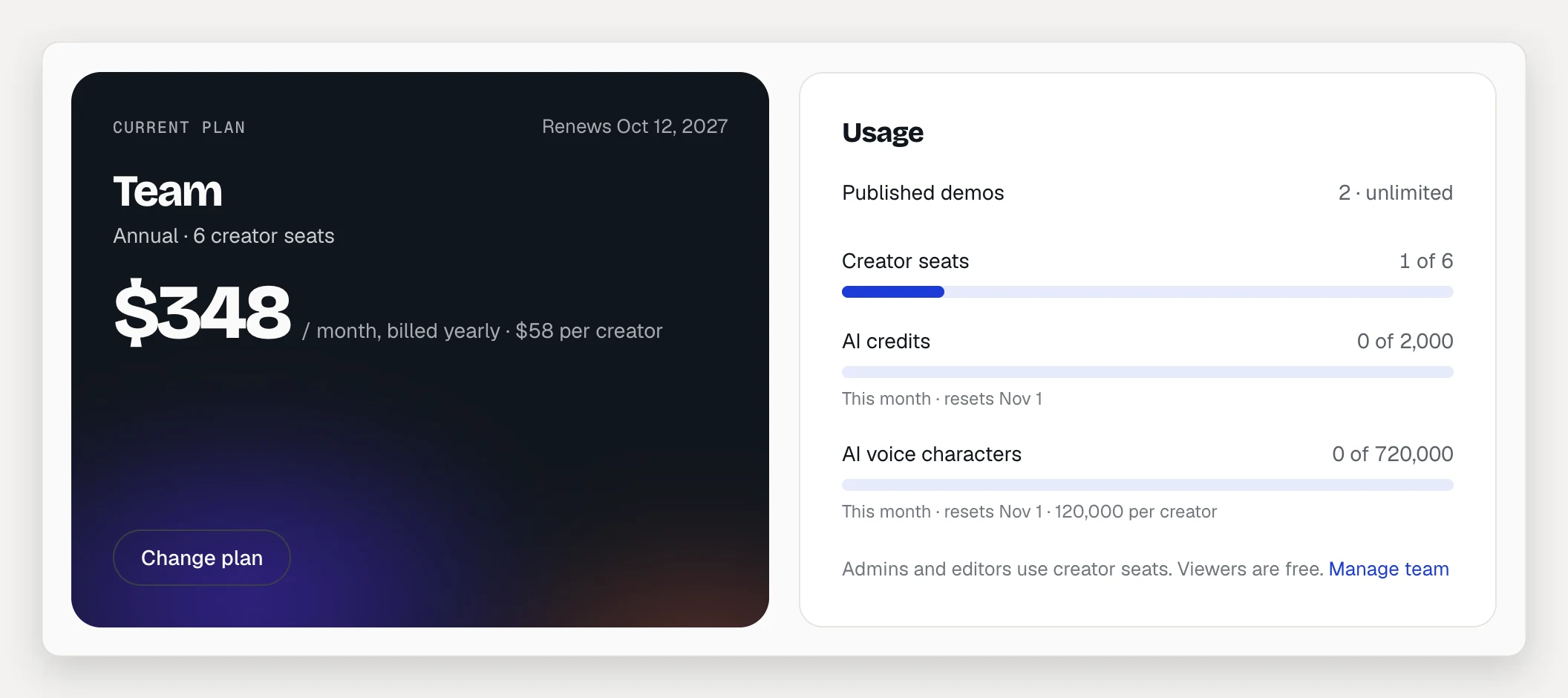
The Usage panel on Billing shows published demos, creator seats, AI credits and AI voice characters against your plan’s limits. AI credits and AI voice characters reset each calendar month (UTC).
Monthly or annual
Annual billing is about 16% cheaper. You pay for the year up front: $384 per creator seat for Pro, $696 for Team. Monthly billing charges every month. You can switch between them later.
Prices, taxes and invoices
- Prices are in US dollars and don’t include tax. Any applicable tax is charged on top.
- Paid plans renew automatically at the end of each billing period until you cancel.
- Your invoices are listed under Invoices on Billing, each with a PDF link.
- To change your card, click Update next to the payment method. Stripe’s billing portal opens.
Troubleshooting
- “Your last payment failed.” Click Update payment method in the banner and add a working card. AI voices pause until the payment goes through.
- I don’t see Billing. Only admins can see and change billing. Ask an admin of your workspace.