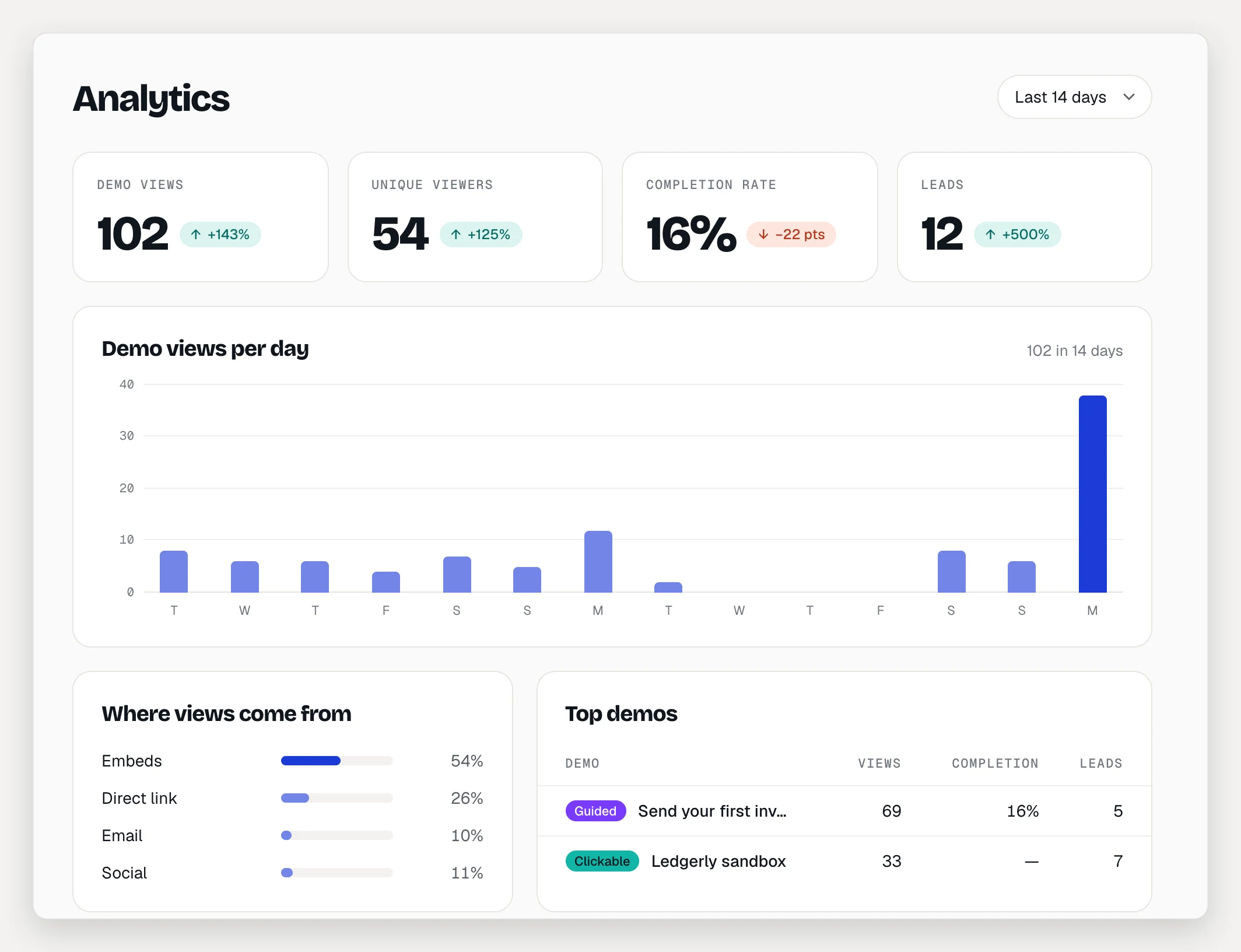
AtriumKit counts how people watch your published demos. You’ll find the numbers in two places: Analytics in the sidebar for the whole workspace, and the Analytics tab on each demo. Collections have their own Analytics tab too.
Every plan counts views, unique viewers and leads. Completion, time in demo, step funnels, recent viewers, traffic sources and per-link numbers are on Pro and Team.
Choose a date range
Use the menu at the top right: Last 7 days, Last 14 days, Last 30 days or Last 90 days. Days are UTC calendar days and include today. Tiles also show the change against the previous period of the same length, when there is one.
See the whole workspace
Open Analytics in the sidebar.
- The tiles show Demo views, Unique viewers, Completion rate and Leads.
- Demo views per day charts every demo together.
- Where views come from splits views into Embeds, Direct link, Email and Social. Visits from webmail count as Email, visits from social sites as Social, and everything else that isn’t an embed as Direct link.
- Top demos lists your 10 most viewed demos with their views, completion and leads. Click one to open its analytics.
See one demo
Open the demo and click the Analytics tab. Keep Overview selected.
- The tiles show Views, Unique viewers, Completion rate, Avg. time in demo and Leads. Completion rate is for guided demos only.
- Views per day charts this demo.
- Viewed in collections shows views that came from collection pages, if the demo is in one.
Find where viewers drop off
For a guided demo, the Step funnel lists each step of the published version and the share of sessions that reached it. A note under a step, like “−12 dropped here”, shows how many sessions stopped before it.
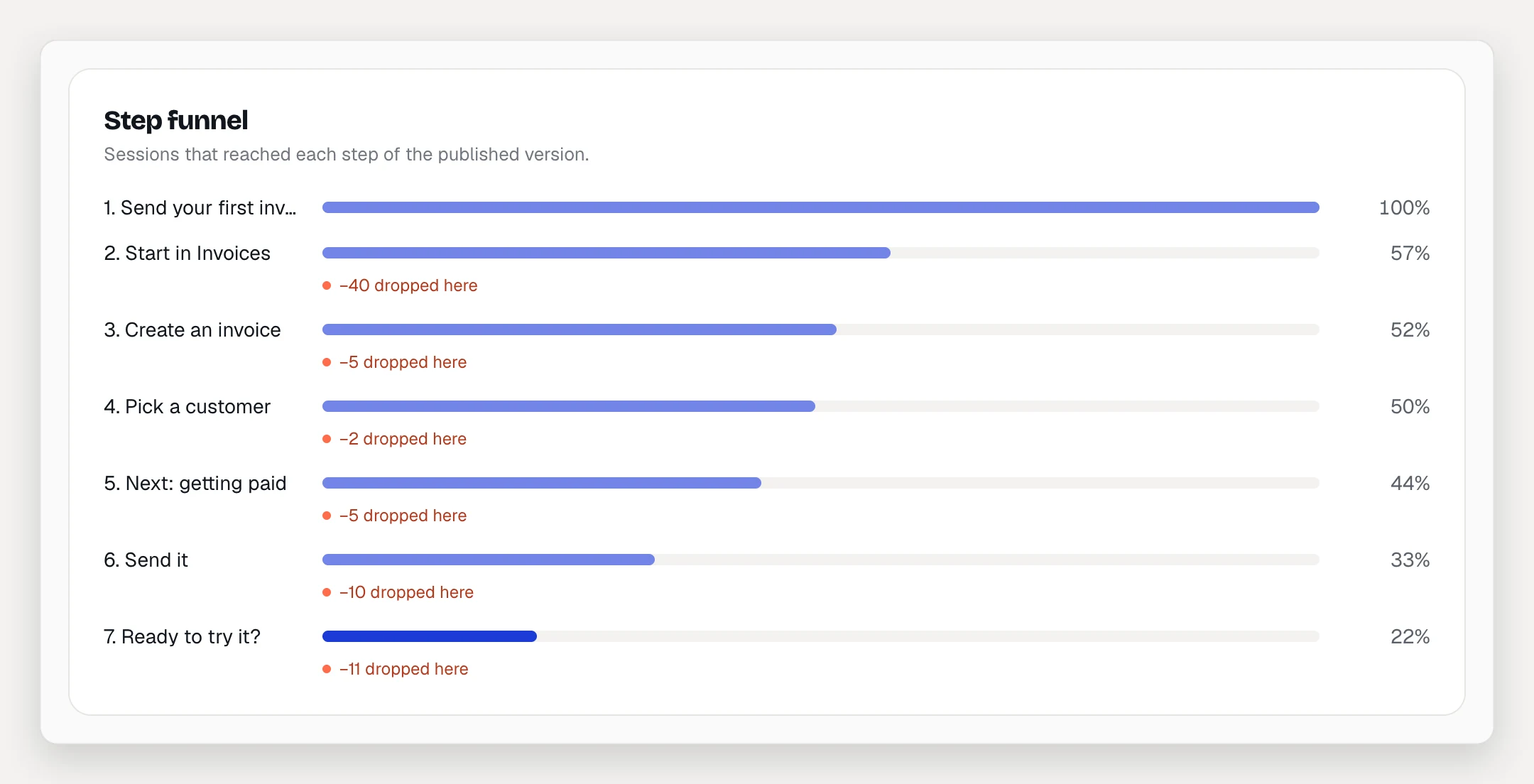
If the demo branches, the funnel follows each path. “Left here” counts sessions that ended on a step without finishing, out of that step’s own viewers. Choices shows which path viewers picked at each step with choices.
For a clickable demo you get Screen visits and Hotspot clicks instead. If the demo has a voiceover, a Narration section shows how many sessions listened with sound and captions on, and how much of each step’s or screen’s narration was heard.
See who watched
Recent viewers lists the last 25 sessions in the range:
- Viewer: the email, if they left one, or the label of their personalized link. Otherwise “Anonymous” and their country.
- When, Time spent, and the number of Steps or Screens seen.
- Source (embed, direct link, email or social) and whether they Finished.
Compare personalized links
Switch the demo’s analytics from Overview to Links (Pro and Team). Personalized links shows each link’s Views, Finished (or Sessions for clickable demos), Leads and when it was Last opened.
Guide readers
The Step-by-step guide section counts Guide readers and Unique readers on every plan. Exports (copies, Markdown downloads, prints) and Step reach, how far readers get, are on Pro and Team. Reading the guide never counts as a demo view.
What’s counted and what isn’t
- Only the published demo is counted. Previews in the editor send nothing, and presenter mode isn’t tracked.
- A viewer is a random ID stored in their browser. AtriumKit uses no advertising cookies and knows who someone is only when they leave their email or open a personalized link.
- The same person on two browsers counts as two unique viewers.
Troubleshooting
- “Publish this demo to start collecting views.” The demo isn’t live yet. Publish it first.
- Completion rate or Avg. time in demo shows a dash (—). Both are Pro and Team numbers, and only guided demos have a completion rate. A dash also means nobody watched in the range.
- A step is missing from the funnel. The funnel follows the published version. Publish your changes to see new steps.