AI translates your demo’s copy, and the player shows each viewer the language that fits. You can check and edit every string.
AI translations are on Pro and Team, and use AI credits: 1 credit per 50 strings.
Supported languages
English, Spanish, French, German, Italian, Portuguese (Brazil), Dutch, Polish, Swedish, Turkish, Japanese, Korean, Chinese (Simplified), Chinese (Traditional) and Indonesian. Write a demo in any of them and translate it into the other 14. Right-to-left languages aren’t supported yet.
Set the language you write in
On the demo’s Languages tab, Written in is the demo’s own language. Viewers whose language isn’t available see it, and Write with AI writes in it unless you pick another language there.
Add a language and translate
- Open the demo and click the Languages tab.
- Under Add a language, pick a language and click Add.
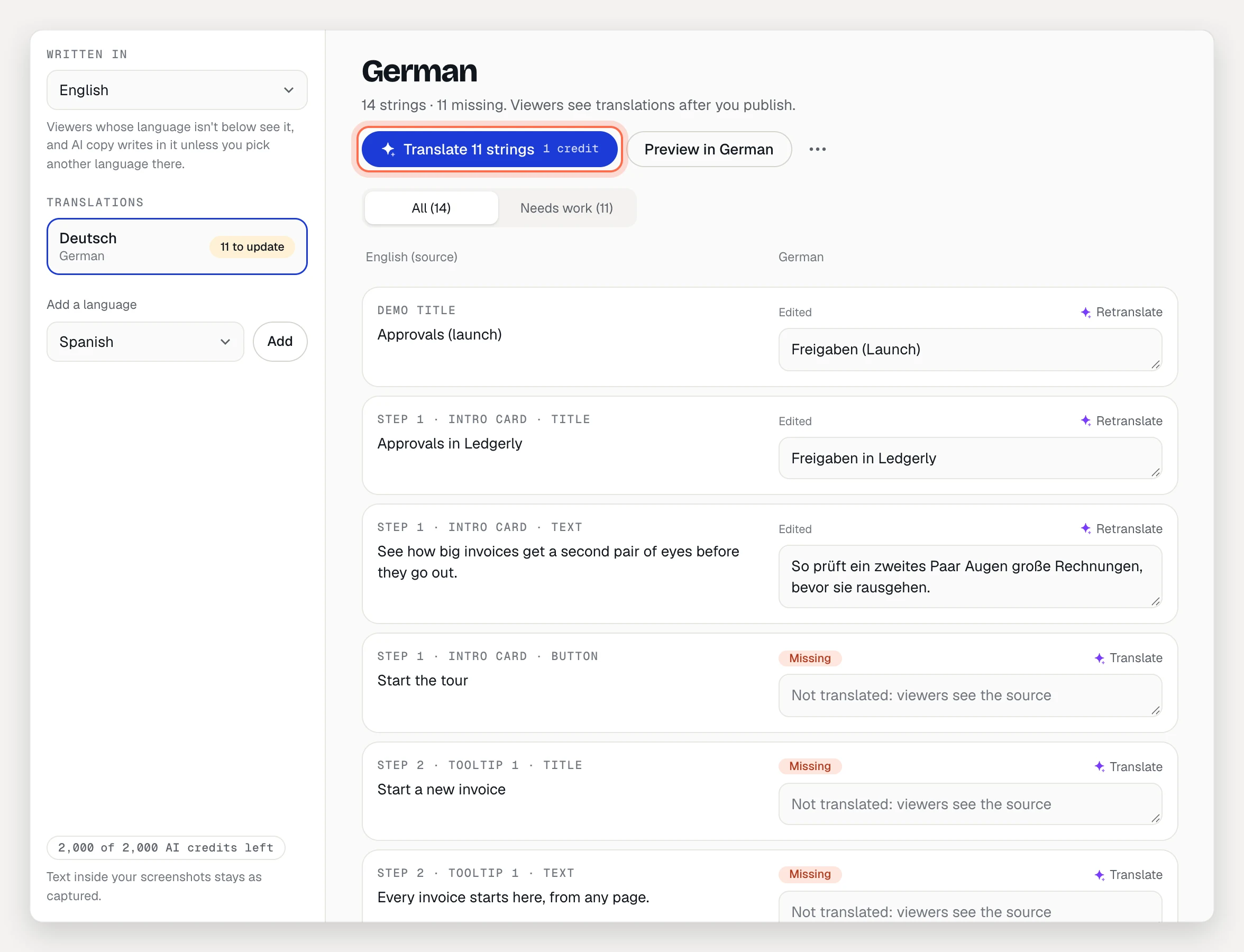
- Click Translate N strings. The button shows what it costs.
- Read through the strings. Each row shows the source on the left and the translation on the right, labeled with where it appears, such as “Step 3 · Tooltip 2 · Title”.
- Publish the demo. Viewers see translations after you publish.
Keep translations up to date
When you change the source copy, its translations go out of date. The language list shows Up to date, Not translated or N to update for each language, and each string can show:
- Missing: not translated yet. Viewers see the source.
- Out of date: the source changed since it was translated.
- Needs review: the translation lost or added a
{{variable}}, so viewers see the source until it’s fixed.
To fix them:
- Click Translate N strings to translate everything missing or out of date.
- Click Translate or Retranslate on a single string (1 credit).
- Click Keep on an out-of-date string if the translation is still right.
- Use the Needs work filter to see only the strings that need you.
The language’s ⋯ menu has Retranslate everything and Remove language.
Edit a translation by hand
Click into any translation and type. It saves when you leave the field and is marked Edited instead of AI. Copy each {{variable}} as it is; only a fallback after | is translated.
Preview a language
Click Preview in followed by the language’s name, for example Preview in German. The draft plays in that language, including the player’s own buttons and any translated narration.
How viewers get their language
The player picks, in this order:
- A
?lang=code in the link, for example?lang=de. Addlang=deto an embed’s address the same way. - The language the viewer picked earlier in the same visit.
- Their browser’s language.
- The demo’s own language.
When a demo has more than one language, viewers get a language picker in the player’s control bar. Player buttons like Next and “Step 2 of 8” are translated too, and the step-by-step guide is available in every language you publish.
What isn’t translated
- Text inside captured screens, including your edits to it. Only your own copy is translated.
- Collection pages.
- Narration audio. Scripts are translated with the rest, and each language’s audio is generated on this tab, for example under Narration in German, with Generate narration. See Add a voiceover.
What the AI gets
Only text viewers can read: blurred text is never sent, and emails, phone numbers and long numbers are masked. If the demo’s brand kit has a knowledge kit, the AI keeps glossary terms consistent and leaves your product name as it is.
If the workspace moves to Free, your translations are kept, but viewers see the demo in its own language only.